Glossary
Photo editing, in plain words.
45 terms you meet when you edit photos and video, from Apple Log to XMP. Each one in a few lines, and where it applies, how it works in masoc.
From A to Z.
Tap a letter to jump to it.
A
- Apple Log
A flat, logarithmic way of recording video on iPhone Pro models, first on iPhone 15 Pro. It keeps more highlight and shadow detail for grading, and iPhone 17 Pro added Apple Log 2.
masoc recognizes both on its own and develops them like RAW. More about Log video.
- Apple ProRAW
Apple’s RAW format on iPhone Pro models. It keeps the sensor data together with the iPhone’s multi-frame processing and is saved as a DNG file.
masoc opens it like any RAW, with white balance in true Kelvin. More about RAW in masoc.
B
- Bokeh
The look of the out-of-focus parts of a photo, from the Japanese word for blur. Smooth bokeh turns small lights into soft discs.
masoc adds it to any photo from the depth it reads in the image, with the focus wherever you tap. More about background blur.
- Bracketing
Taking several shots of one scene in quick succession, each at a different exposure, so together they hold detail from the deepest shadows to the brightest sky.
masoc merges a bracket into one HDR photo, right on your device. More about panorama and HDR.
C
- Calibration
Adjusts how a photo’s red, green and blue primaries are rendered, which shifts every color built from them at once.
masoc’s Calibration sets the hue and saturation of each primary and adds a tint to the shadows.
- Chromatic aberration
Color fringes along high-contrast edges, because a lens doesn’t bend every color of light exactly the same way. They often show as purple or green outlines, like branches against a bright sky.
masoc removes them with its lens tools, with Defringe sliders for purple and for green.
- Clarity
Adds contrast between neighboring areas rather than across the whole photo, for more punch and depth. Below zero, it softens.
In masoc, Clarity works on broad areas, Structure on medium detail and Texture on the finest.
- Color grading
Tinting the shadows, midtones and highlights in different colors to set a mood, like cool shadows under warm highlights. The term comes from film and video.
masoc grades shadows, midtones and highlights apart and the whole photo at once, on photos and video.
- Color space sRGB, Display P3, Adobe RGB
The range of colors a file or screen can hold. sRGB is the standard of the web, Display P3 reaches more vivid reds and greens, and Adobe RGB extends further into greens and cyans for print.
masoc edits in Display P3 and exports in all three. More about how masoc is built.
- Contrast
The difference between the light and dark parts of a photo. More contrast makes it punchy, less makes it soft and flat.
On RAW, masoc starts from a gentle base curve, so a photo opens with natural contrast. More about RAW in masoc.
- Crop
Cutting away the edges of a photo to tighten the framing or fit an aspect ratio, like 1:1 for a square post.
masoc crops freely or to Original, 1:1, 4:3, 3:2 or 16:9, and straightens by up to 45 degrees either way.
D
- Dehaze
Removes the milky veil that haze, fog or smog lays over a scene, bringing back contrast and color in the distance. Pulled the other way, it adds atmosphere.
masoc estimates the haze from the photo itself, and Dehaze works inside masks too.
- Demosaicing
Most camera sensors record just one color per pixel, red, green or blue, through a grid of color filters. Demosaicing fills in the two missing colors at every pixel, the first step in developing a RAW file.
masoc leaves it to the RAW engine built into iOS, iPadOS and macOS. More about RAW in masoc.
- Depth map
A grayscale image that records how far away each part of a scene is. iPhone saves one with every Portrait mode photo.
masoc can also estimate one from a single ordinary photo, on your device, to blur the background. More about background blur.
- DNG Digital Negative
An open RAW format published by Adobe. Apple ProRAW and many cameras save their RAW files as DNG.
masoc opens DNG files and repairs dead and hot pixels in uncompressed DNGs from older cameras. More about RAW in masoc.
E
- Exposure (EV)
How bright a photo is overall, counted in exposure values, or stops: +1 EV doubles the light, −1 EV halves it.
In masoc, Exposure runs from −5 to +5 EV and lifts the midtones most, easing off toward white. More about RAW in masoc.
F
- Film simulation
A color and tone profile modeled on a film stock or a classic look. The name comes from Fujifilm, which builds them into its cameras.
masoc has 22 built-in looks, among them Fujifilm, Kodak and Ilford styles, for photos from any camera. More about film simulations.
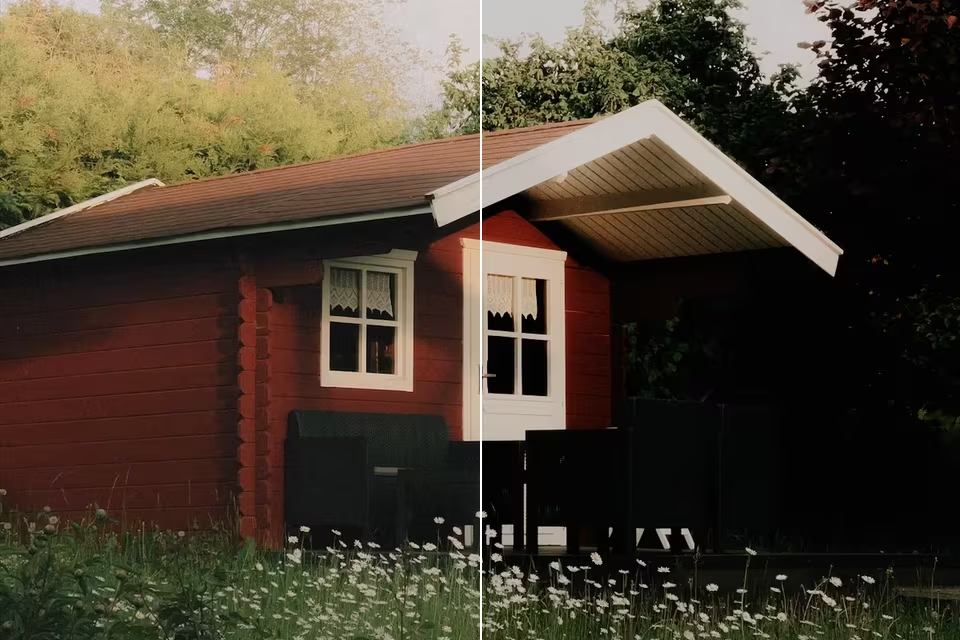
Left as shot, right with Classic Chrome.
G
- Grain
The fine, random texture of film, formed by the silver or dye particles that make up the image. Added digitally, it gives a photo a filmic feel.
masoc’s Grain has amount, size and roughness, and it sits on top of every mask.
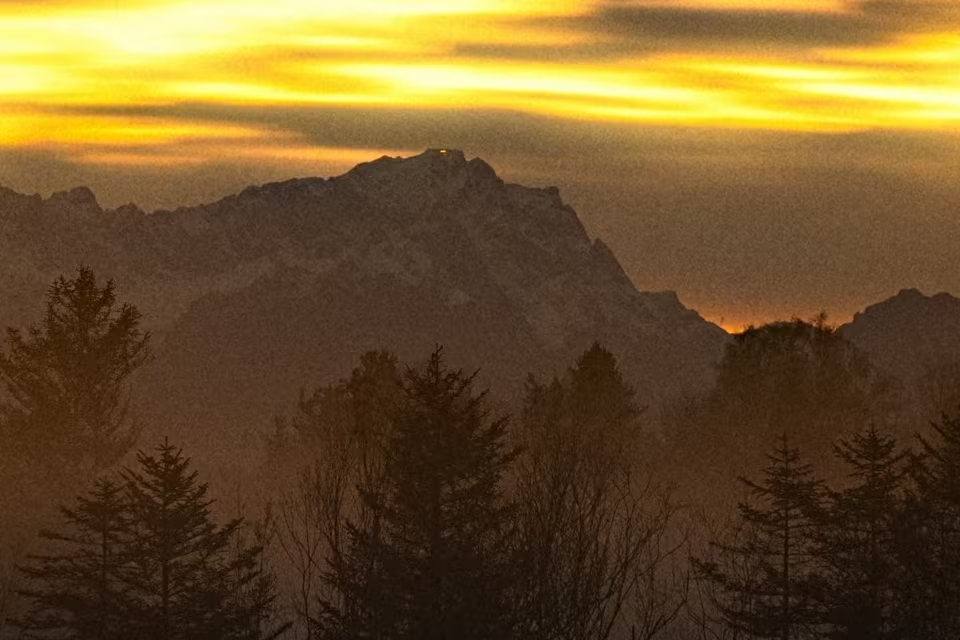
Grain from masoc, seen at full size.
H
- HDR High dynamic range
Detail across a wider range of brightness than one normal exposure can hold. HDR merging combines a bracket into one photo, and HDR screens show highlights brighter than ordinary white.
masoc merges brackets into a photo that keeps the light above white, ready to edit like RAW. More about panorama and HDR.
- HEIC
The photo format iPhone saves by default: an image in a HEIF container, compressed with HEVC. It is usually smaller than a JPEG of similar quality.
HEIC is masoc’s default export format, next to JPEG and PNG.
- Highlights and shadows
Sliders that darken the bright parts or lighten the dark parts of a photo while leaving the midtones mostly alone. Whites and Blacks set the very ends of the range.
In masoc, Highlights and Shadows judge each pixel by its surroundings, so a bright sky comes down and dark corners open up. More about RAW in masoc.
- HSL Color mixer
Hue, saturation and luminance: a mixer that changes one range of colors at a time, like deepening only the blue of the sky.
masoc’s Color Mixer has eight bands, from red to magenta, on photos and video.
I
- Inpainting
Filling part of an image with new content that matches its surroundings. It’s how unwanted objects disappear from a photo.
In masoc, you paint over what should go with Retouch, and a model on your device paints the fill. More about on-device AI.
K
- Kelvin K
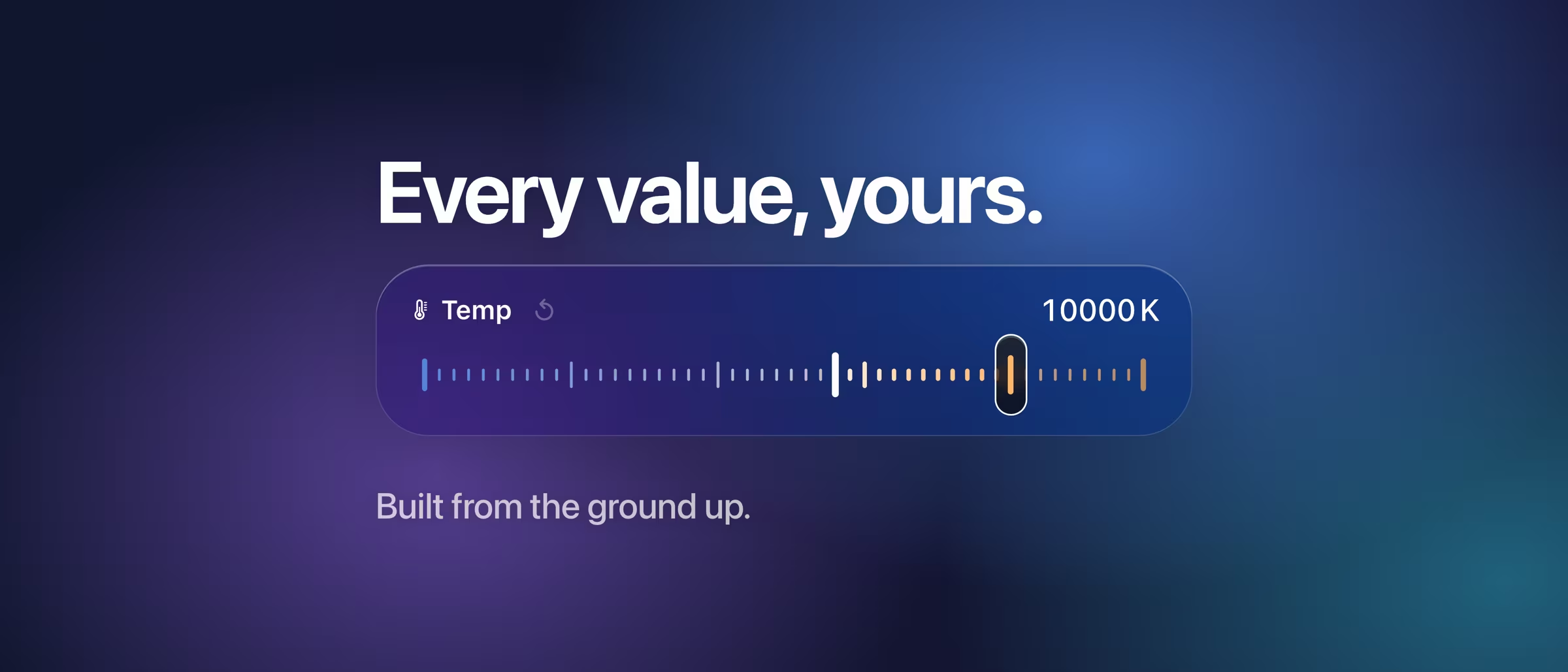
The unit of color temperature. Warm tungsten light sits near 2,800 K, daylight around 5,500 K and cool shade near 7,500 K.
On RAW, masoc sets white balance in true Kelvin, starting from the camera’s As Shot value. More about RAW in masoc.
L
- Log video
Video recorded with a logarithmic curve that fits a wide range of light into the file, so it looks flat and gray straight from the camera. It’s made to be graded, often with a LUT.
masoc develops twelve camera Log profiles like RAW, from Apple Log to ARRI LogC4. More about Log video.
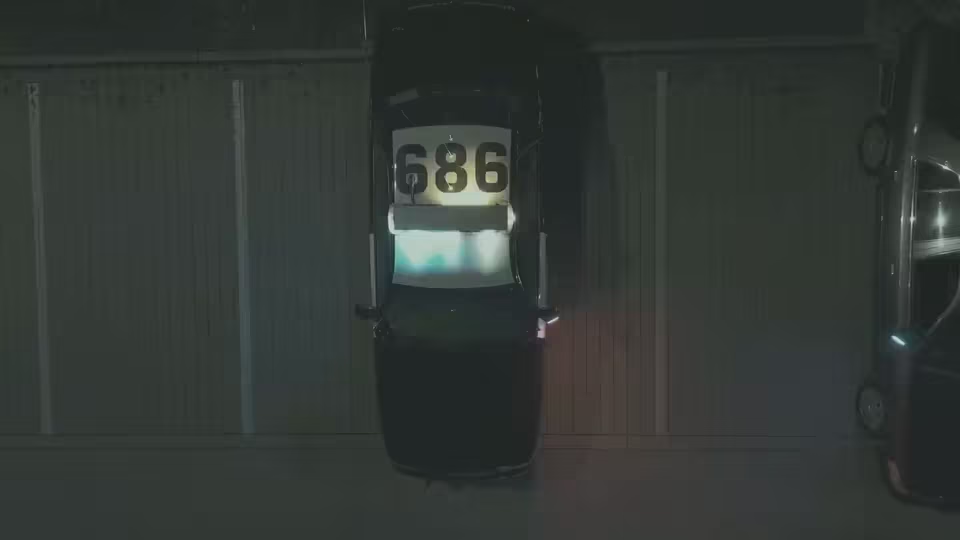
Log footage from a drone, as recorded. - LUT Lookup table, .cube
A lookup table that maps every input color to an output color, which makes it a compact way to store a look. The .cube file is a widely used format for them.
Every built-in look in masoc is a 3D LUT, and you can import your own .cube files for photos and video. More about film looks.
M
- Mask
A selection that limits an edit to one part of the photo, like the sky, a face or the background.
masoc finds subject, sky and background on its own, adds linear, radial and brush masks, and combines them in one chain. More about AI masks.
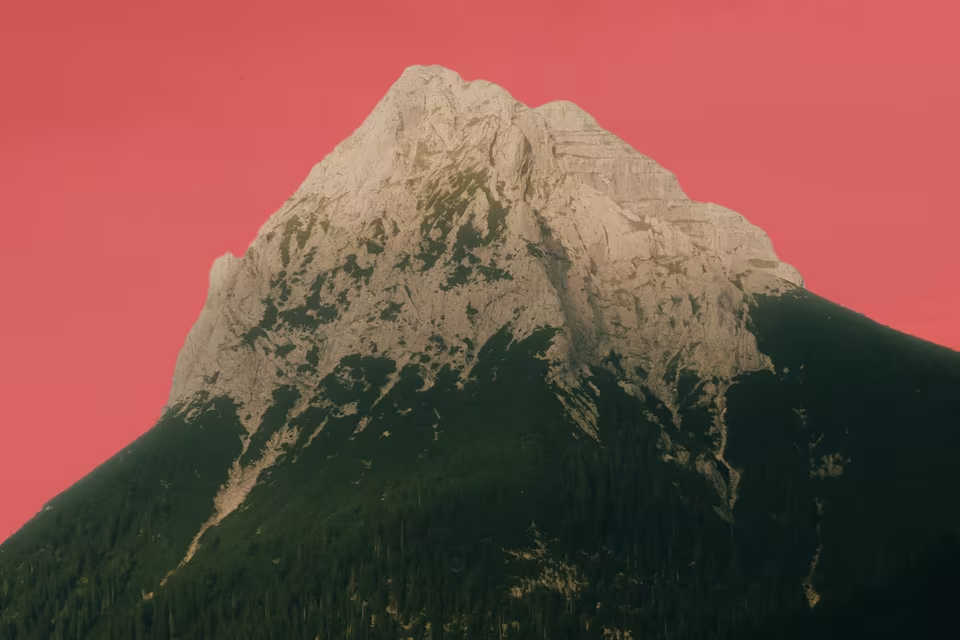
A Sky mask in masoc, marked in red.
N
- Noise reduction
Smooths the speckles that high ISO and dark scenes leave in a photo. Luminance noise is speckled brightness, color noise is blotches of random color.
masoc has a slider for each, and noise reduction works inside masks too.
- Non-destructive editing
Editing that saves your changes as instructions beside the original instead of overwriting it, so every step can be changed or undone later.
masoc never changes your original file and keeps your edits separately, ready to change, copy or reset. More about how masoc is built.
O
- OpenEXR .exr
A high dynamic range image format from the film industry, now a project of the Academy Software Foundation. It stores colors as floating-point numbers, so light brighter than white isn’t cut off.
masoc saves panorama and HDR merges as 16-bit OpenEXR files. More about panorama and HDR.
P
- Panorama
Several overlapping photos stitched into one wide image. The projection, like spherical or cylindrical, decides how the wide view is laid flat.
masoc stitches panoramas on iPhone, iPad and Mac, right on the device. More about panorama and HDR.
- Perspective correction Upright, keystone
Straightens lines that lean or converge because the camera was tilted, like buildings that seem to fall backward.
masoc corrects vertical and horizontal perspective by hand, and Auto Upright finds the lines in the photo and sets it for you.
- Preset
A saved set of edits you can apply to other photos in one tap, for a consistent look across a shoot.
Save any edit in masoc as a preset, or bring your .xmp presets along. More about bringing your presets.
- Profile
A word with a few meanings. A color profile tells software which color space a file uses, a camera profile sets the starting colors of a RAW file, and a Log profile describes how a video was recorded.
In masoc, film looks sit under Looks › Profiles, and a Log clip gets its profile in the Profile menu. More about film looks.
R
- RAW
The unprocessed data from a camera sensor, saved before white balance, color and sharpening are baked in. It leaves far more room to recover highlights and shadows than a JPEG.
masoc opens Apple ProRAW and RAW files from many cameras, and develops them on your device. More about RAW in masoc.
- Rec. 709 BT.709
The color standard of HD video, from the ITU. It’s what standard dynamic range video is made for, on TVs, phones and the web.
masoc exports video in SDR with Rec. 709, as HEVC 10-bit or H.264. More about Log video.
S
- Saturation and vibrance
Saturation makes every color more or less intense by the same amount. Vibrance boosts muted colors most and holds back the ones that are already strong, which keeps skin tones more natural.
masoc has both, and both work inside masks too.
- Structure
Local contrast at a medium scale, which brings out the shape of things like rocks, bark or clouds.
In masoc, Structure sits between Clarity and Texture, and it works inside masks too.
T
- Texture
Brings out or smooths the finest detail, like pores, fabric or leaves, without touching the larger shapes.
Pulled down inside a mask in masoc, it softens skin and leaves the rest crisp. More about AI masks.
- Tint
The second axis of white balance. Temperature runs from blue to amber, tint from green to magenta, and it fixes the green cast of some fluorescent light.
masoc sets it in the decoder on RAW, and shifts it from −100 to +100 on JPEG and HEIC. More about RAW in masoc.
- Tone curve Curves
A graph that maps input brightness to output brightness. An S-shaped curve adds contrast, and curves on the red, green and blue channels shift colors.
masoc’s tone curve takes free points on RGB, red, green and blue, on photos and video.
V
- Vignette
A darkening toward the corners of a photo. Lenses cause it, especially wide open, and photographers add it on purpose to draw the eye inward.
masoc can correct the lens vignetting or add a vignette to the cropped frame.
W
- White balance
Makes white look white under any light by correcting the color cast of the light source. Raising the Kelvin value tells the editor the light was bluer, so the photo turns warmer.
masoc has As Shot, Auto, a picker for something neutral and, on RAW, presets like Daylight and Tungsten. More about RAW in masoc.
X
- XMP .xmp
Extensible Metadata Platform, Adobe’s format for metadata and edit settings in a small text file. Lightroom and Camera Raw save their presets as .xmp files.
masoc imports them as presets and exports its own presets as .xmp, linear and radial masks included. More about bringing your presets.
Coming soon.
The beta has ended. The App Store is next.
masoc is being prepared for the App Store. Sign up for the newsletter, and you’ll hear first when it lands.
Questions
- What is the difference between RAW and JPEG?
- A RAW file holds the sensor data before white balance, color and sharpening are baked in, so there is far more room to recover highlights and shadows. A JPEG is finished and compact, ready to share.
- What does a LUT do to a photo?
- A LUT maps every color in a photo to a new one, which makes it a compact way to store a look. Every built-in look in masoc is a LUT, and you can import your own .cube files.
- Should I export in sRGB or Display P3?
- sRGB is the safe choice for the web and for screens without wide color. Display P3 keeps more vivid reds and greens on screens that can show them. masoc exports both, and Adobe RGB for print.
- What does Kelvin mean in white balance?
- Kelvin measures the color temperature of light, from warm tungsten near 2,800 K to cool shade near 7,500 K. Set it to match the light in the scene, and white turns neutral. On RAW, masoc works in true Kelvin.
Apple, iPhone, iPad, Mac, Apple ProRAW and Apple Log are trademarks of Apple Inc. Adobe, Lightroom and Camera Raw are trademarks of Adobe Inc. Fujifilm, Classic Chrome, Kodak, Ilford, ARRI, DNG, XMP, HEIC, Display P3, OpenEXR and the names of Log profiles are trademarks of their respective owners. masoc is not affiliated with them.