Film look for video
Film grain and halation for video.
masoc 1.1 gives your clips two things film always had: grain that moves with every frame, and a warm glow around bright lights. On iPhone, iPad and Mac, next to the looks, Log development and grading you already know.
Why still grain looks wrong on video.
Film grain is part of the picture. A grain overlay is a layer on top of it.
On film, every frame is a fresh piece of emulsion, and its silver crystals sit in new places each time. That is why film grain dances. Put one grain pattern over a whole clip, and it stays frozen while the picture moves underneath. The eye reads it right away: it looks like dust on a window, not like film.
masoc draws a new grain pattern for every frame. The pattern follows the moment in the clip, so the same frame always gets the same grain. What you see while the clip plays is exactly what the export writes.
Halation only finds the brightest lights.
A glow that comes from the film, not from the whole frame.
CineStill describes halation as “the reflection of bright points of light inside the film base”. Light passes the emulsion, bounces back and exposes the red layer a second time. Only strong light makes it back, so only lamps, neon, headlights and the sun get the red halo. Faces and walls stay clean.
masoc works the same way. Threshold decides where the glow starts: at 0, everything above 70 percent brightness can glow, at 100 only lights close to pure white. Small, hard lights like a street lamp count for more than a large bright sky, as they would on film. The halo shows on the dark around a light and holds back on the light itself.
Quote from CineStill’s FAQ, checked in October 2026. More about the film in the CineStill 800T look.
Log footage knows how bright the lamps were.
More light above white, and halation uses it.
A standard clip stores a street lamp and a white shirt as the same white. Log footage keeps the highlights above white, so the lamp still holds its real brightness. masoc develops Log like RAW, from Apple Log to S-Log3, and its halation reads the light before the clip is fitted to the screen.
A lamp that was several times brighter than white glows several times stronger, up to twelve times. On a Log clip, the brightest lights get the biggest halo, and dimmer ones stay calm.
A film look for video, step by step.
The same tools on iPhone, iPad and Mac.
- Open the clip. Import it from Photos or Files. Log clips carry a LOG badge, and masoc develops them like RAW before anything else.
- Pick a look. Under Looks, choose a built-in film look or your own .cube LUT and set its intensity.
- Add halation. Open Effects › Halation. Raise Halation, then shape it with Size, Threshold and Hue.
- Add grain. Under Effects › Grain, set Grain, then Size for the crystals and Roughness for how clumpy they get.
- Compare and export. Press and hold the clip to see the original. Then export in HEVC 10-bit or H.264.
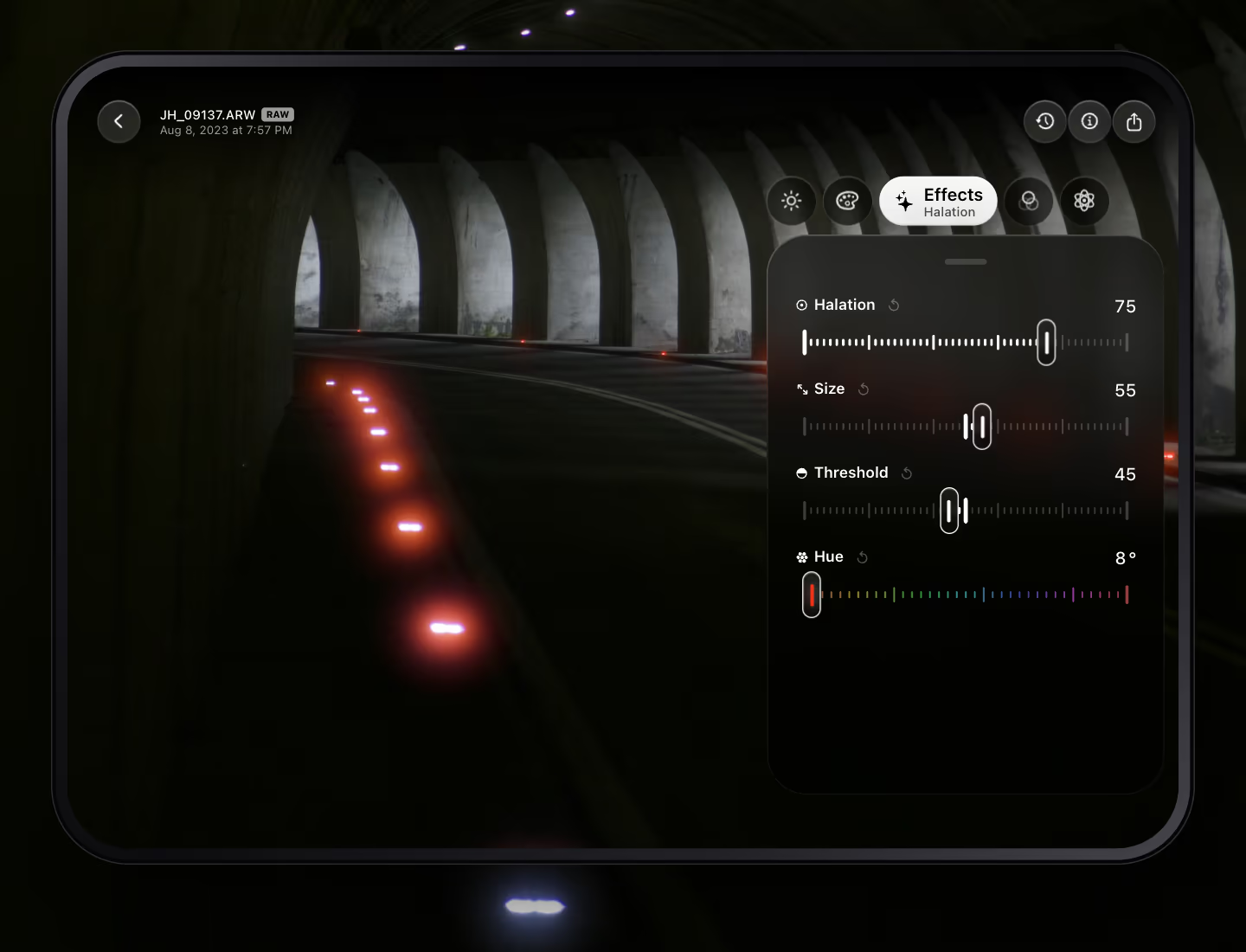
- Halation sets the strength, from 0 to 100.
- Size sets how far the glow spreads around each light.
- Threshold sets how bright a light has to be before it glows.
- Hue picks the color. It starts at red, like film, and goes all the way around.
Halation sits on top of your film look, and the grain comes after it, so the grain lies over the glow, as it would on film. Found a mix you like? Copy the edit and paste Effects onto the next clip, or save it as a preset. On photos, you can also type “film halation” into Smart Edit.
What a clip takes from Effects.
Only the effects that hold up frame by frame.
Clips get Glow and Vignette under Atmosphere, Halation, and Grain with Size and Roughness. Dehaze stays with photos, because it measures the whole frame and would flicker from one frame to the next. Texture, Clarity and Structure stay too, since they are too heavy to run live on 4K video.
Everything else for video is still there: light, the tone curve, the color mixer, color grading, calibration, looks, LUTs and crop from 9:16 to 2.39:1. Export as HEVC 10-bit or H.264, at the original size, 4K, 1080p or 720p, and at the clip’s own frame rate or lower. Sound is copied across untouched.
Where else you find it.
Halation used to live in desktop grading software.
DaVinci Resolve added halation, bloom and grain to its Film Look Creator in version 19. Adobe added a Glow effect with a halation style to Camera Raw in August 2026, for photos. Both are fine tools on the computer. masoc puts the same idea on your phone, your iPad and your Mac, for photos and clips alike, and edits on your device.
Sources: CineD on DaVinci Resolve 19 (April 14, 2024), PetaPixel on the Camera Raw Glow effect (September 4, 2026), both checked in October 2026.
Get masoc.
Now on the App Store for iPhone, iPad and Mac.
Free to download, with every tool and three free exports. Download masoc on the App Store, or sign up for the newsletter to hear about new tools and looks.
Questions
- How do I add film grain to a video on iPhone?
- Open the clip in masoc and go to Effects › Grain. Set Grain from 0 to 100, then Size and Roughness. The grain changes with every frame, like film, and leaves with the export in HEVC 10-bit or H.264.
- What is a halation effect?
- Halation is the red or orange glow around bright lights on color film. Light reflects inside the film base and exposes the red layer again. In masoc 1.1 it sits under Effects › Halation, for photos and video.
- Does the grain look the same in playback and in the export?
- Yes. masoc picks the grain pattern from the moment in the clip, so the same frame always gets the same grain, while you play the clip and when you export it.
- Does halation work on Log footage?
- Yes. masoc develops the Log profile first, and halation reads the light above white. A lamp that was brighter than white glows stronger, up to twelve times.
- How much does masoc cost?
- masoc is free to download, with every tool and three free exports. After that, Unlock masoc costs $3.99 a month, $24.99 a year or $69 once. The pricing page has the details.
Apple, iPhone, iPhone Duo, iPad, Mac, Apple Log and App Store are trademarks of Apple Inc. DaVinci Resolve is a trademark of Blackmagic Design. Adobe and Camera Raw are trademarks of Adobe Inc. CineStill and S-Log3 are trademarks of their owners. masoc is not affiliated with them.