New in masoc 1.1
Unfolded, with a glow.
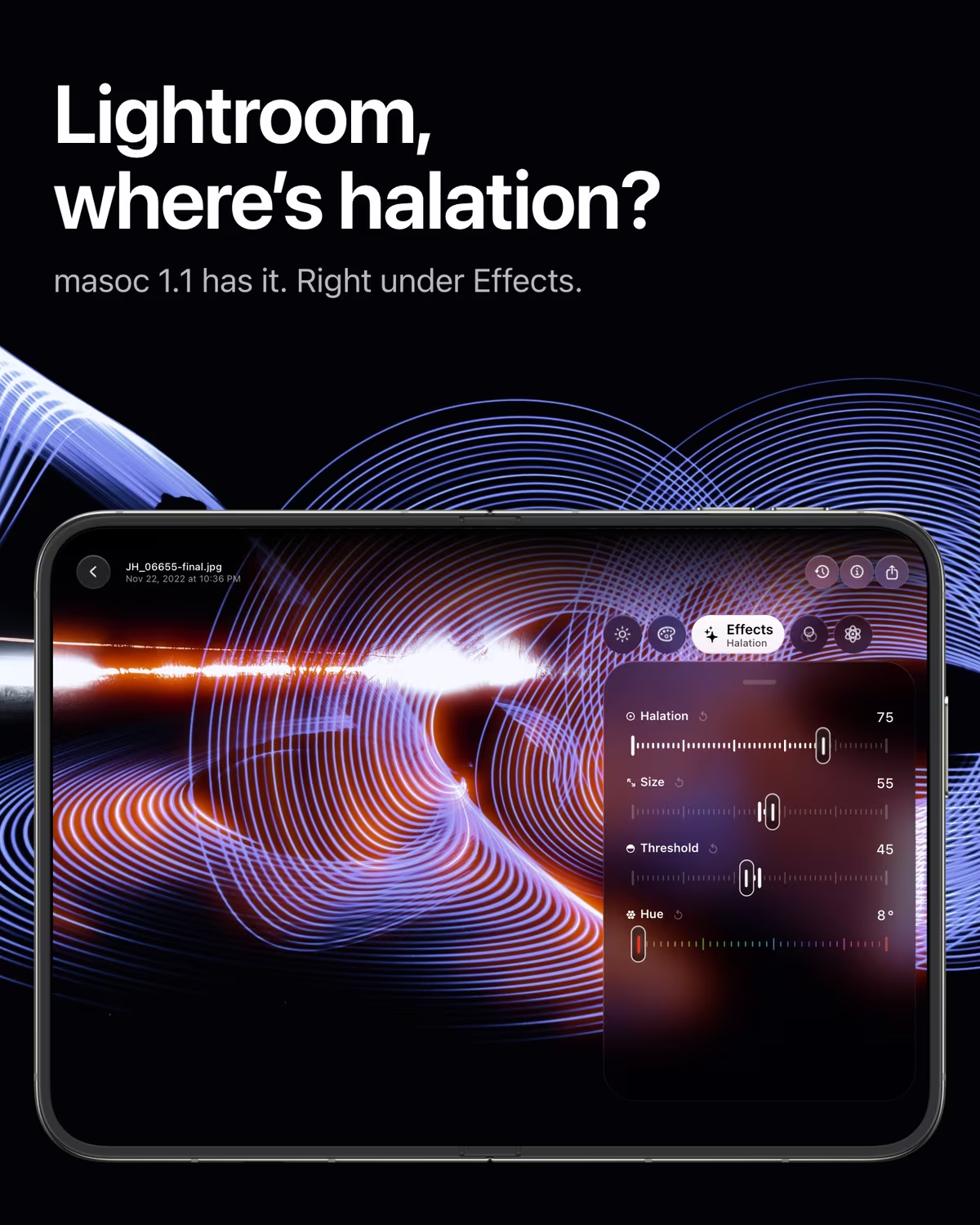
masoc 1.1 is made for iPhone Duo and brings film halation to photos and video. Here is what the bigger screen changes, how the glow works, and why Lightroom is still waiting on both.
A phone that opens like a book.
Folded, it’s an iPhone. Open, it’s almost an iPad mini.
iPhone Duo is Apple’s first foldable. Closed, its outer display measures 5.4 inches. Open, the inner one has 7.6 inches, and it bends along a fold in the middle. It went on sale on October 23, 2026, and it changes size while you hold it.
For a photo editor, that is the dream and the problem. More room for the photo and the sliders, but only if the app knows where the fold is, where the camera sits and what happens when you close it halfway through an edit.
Display sizes from Apple’s iPhone Duo page, checked in October 2026.
masoc uses the whole screen.
In every way you can hold it.
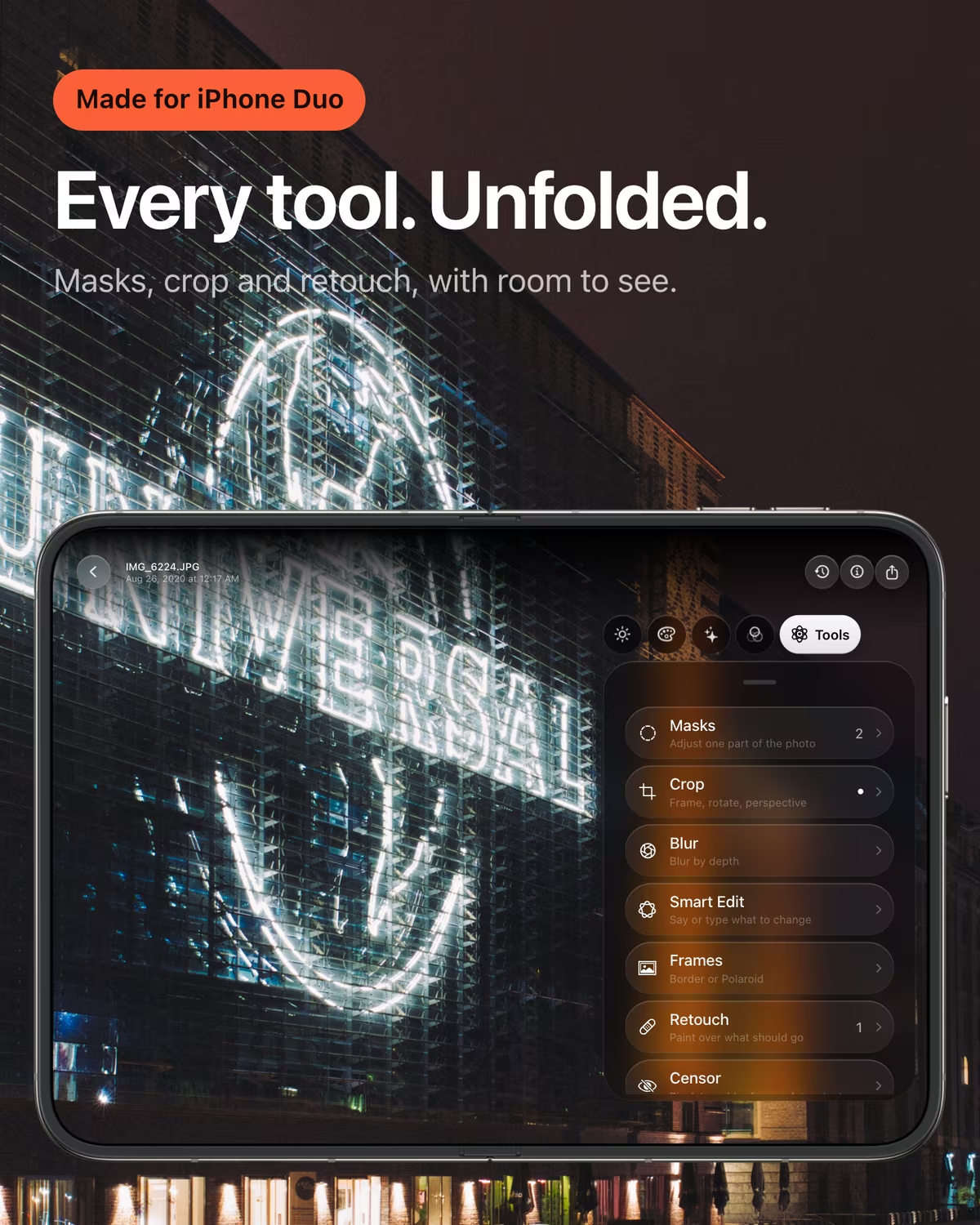
masoc 1.1 doesn’t stretch an iPhone layout. It reads the fold and the camera and lays the editor out around them. Unfold the phone in the middle of an edit, and you land on the same tool, with the same slider in your hand.
Folded
The editor runs like on iPhone, and the photo grows into the empty column beside the camera.
Open
Photo on one side, the panel on the other. The status bar steps aside, so the editor gets all 951 points.
Open, turned
The photo on top, the panel below it, the way you hold a tall iPad.
Book
Photo on one half, panel on the other, split right at the fold. The library splits its grid there too.
Laptop
The photo stands up top, the sliders lie flat below. In the video editor, clip and playback sit above the fold.
The rest of the app comes along. The library keeps your place when you fold, Settings spread over two columns, and the export window stays open. It’s the same masoc as on iPhone, iPad and Mac, with the same tools in the same places.
Halation: the glow film gives away for free.
Light that leaks back into the picture.
On color film, bright light passes through the emulsion, bounces off the film base and comes back. On its way, it exposes the red layer a second time. The result is a soft red or orange halo around street lamps, neon and headlights. Films like CineStill 800T are loved for exactly this. More about the CineStill 800T look.
How it works in masoc.
Four sliders under Effects.
- Halation sets how strong the glow is, from 0 to 100.
- Size sets how far it spreads around each light.
- Threshold decides how bright a light has to be before it glows.
- Hue picks the color. It starts at red, like film, and goes all the way around.
masoc only lets the brightest parts of the photo glow, so faces and skies stay clean. It measures the lights before your look too, so halation keeps its strength under a film look and sits on top of it, with grain added after.
It works on video as well. Under Effects, clips now get Glow, Vignette, Halation and Grain, and the grain moves with every frame, like real film. On Log footage, halation sees the light above white, so the brightest lamps glow the most. More about the film look for video.
On photos, you can also just ask. Type or say “film halation” in Smart Edit.
The whole trick, in Metal.
A friendly fuck you to Adobe. This is how it’s done, feel free to copy.
No secret sauce, so here is the sauce. Adobe, take notes: these three shaders are the whole halation in masoc, 28 lines that run on the GPU of an iPhone, iPad or Mac. Trimmed a little for reading, and every name renamed in your honor.
// Halation, made for Adobe with love by masoc. Feel free to copy.

// 1. How hard a pixel exposes the film from behind.
float fuckAdobeEnergy(float3 adobePixel, float fuckThreshold) {
    float3 adobeColor = clamp(adobePixel, 0.0, 1.0);
    float fuckingBrightest = pow(max(adobeColor.r, max(adobeColor.g, adobeColor.b)), 1.0 / 2.2);
    float adobeKnee = smoothstep(fuckThreshold, 1.0, fuckingBrightest);
    return dot(adobeColor, float3(0.5, 0.35, 0.15)) * adobeKnee * adobeKnee;
}

// 2. Three blurs: orange close to the light, red further out.
float4 fuckAdobeTint(sample_t fuckNear, sample_t fuckMid, sample_t fuckFar,
                     float3 adobeInnerGlow, float3 adobeOuterGlow, float3 fuckWeights,
                     float adobeGain, float fuckAmount) {
    float3 adobeHalo = adobeInnerGlow * fuckNear.r * fuckWeights.x
                     + mix(adobeInnerGlow, adobeOuterGlow, 0.6) * fuckMid.r * fuckWeights.y
                     + adobeOuterGlow * fuckFar.r * fuckWeights.z;
    return float4(fuckAmount * (1.0 - exp(-adobeGain * adobeHalo)), 1.0);
}

// 3. Added like light: it shows on the dark, not on the lamp.
float4 fuckAdobeBlend(sample_t adobeImage, sample_t fuckingHalo,
                      float fuckThreshold, float holdMyBeerAdobe) {
    float3 adobeColor = adobeImage.rgb;
    float fuckingBrightest = pow(max(adobeColor.r, max(adobeColor.g, adobeColor.b)), 1.0 / 2.2);
    float3 adobeHalo = clamp(fuckingHalo.rgb, 0.0, 1.0)
                     * (1.0 - holdMyBeerAdobe
                            * smoothstep(fuckThreshold, 1.0, fuckingBrightest));
    return float4(adobeColor + adobeHalo * max(1.0 - adobeColor, 0.0), adobeImage.a);
}
Around them, masoc gives small, bright points more weight than large bright areas, so a street lamp glows and a white sky doesn’t. On Log clips it reads the real light above white instead. That is all there is to it. Lightroom users are still waiting, as of October 2026.
Meanwhile, at Adobe.
Lightroom turns 19 this year. It shows.
Adobe added a Glow effect with a halation style to Camera Raw in August 2026. Lightroom doesn’t have it yet. Adobe builds new edit features in Camera Raw first and brings them to the Lightroom apps later. Until then, a red glow in Lightroom means painting it around every light with a brush, one mask at a time.
Not yet
Halation in Lightroom, as of October 2026. It’s in Camera Raw 18.6.
iPhone Duo is in stores. A Lightroom layout for it isn’t, and Adobe hasn’t announced one. Photographers are asking for it in Adobe’s own community, for a laptop mode with the photo on one half and the controls on the other. masoc has that one already.
2007
The year Lightroom 1.0 came out, together with the first iPhone. masoc was built in 2026, for iOS 26, iPadOS 26 and macOS 26.
None of this makes Lightroom a bad app. It’s a big one, with a lot of history to carry. masoc started with none, so a new device or a new idea can land in the next update. Our slightly cheeky breakup letter has the rest: the price, the fee and the cloud.
Sources: PetaPixel on the Camera Raw Glow effect (September 4, 2026), Adobe’s Lightroom release notes, the iPhone Duo request in Adobe’s community, all checked in October 2026.
Side by side.
Lightroom and masoc 1.1, as of October 2026.
| Topic | Lightroom | masoc 1.1 |
|---|---|---|
| Layout for iPhone Duo | Not announced | Folded, open, book and laptop |
| Halation | In Camera Raw, not yet in Lightroom | Under Effects, on photos and video |
| Account | Adobe ID required | None |
| Buy it once | Not possible since 2017 | Yes, or by month or year |
| First released | 2007 | 2026 |
Your move, Lightroom.
We’ll be here. Unfolded.
Your Lightroom presets come along as .xmp files, and your own presets export back the same way. How switching works.
masoc is free to download, with every tool and three free exports: get masoc on the App Store.
Questions
- Does masoc support iPhone Duo?
- Yes. masoc 1.1 lays the editor out around the fold and the camera: folded, open, turned, as a book or as a laptop. Unfold the phone during an edit and you stay on the same tool.
- What is halation in photography?
- Halation is the red or orange glow around bright lights on color film. Light passes through the emulsion, reflects off the film base and exposes the red layer again. Films like CineStill 800T show it strongly.
- Can I add halation to video in masoc?
- Yes. Under Effects, clips get Glow, Vignette, Halation and Grain, and the grain changes with every frame. On Log footage, halation uses the light above white, so the brightest lamps glow the most.
- Does Lightroom have a halation effect?
- Not as of October 2026. Adobe added a Glow effect with a halation style to Camera Raw 18.6 in August 2026 and plans to bring new edit features to the Lightroom apps later. In masoc, Halation sits under Effects.
- How much does masoc cost?
- masoc is free to download, with every tool and three free exports. After that, Unlock masoc costs $3.99 a month, $24.99 a year or $69 once. The pricing page has the details.
Adobe, Lightroom, Lightroom Classic and Camera Raw are trademarks of Adobe Inc. Apple, iPhone, iPhone Duo, iPad, Mac and App Store are trademarks of Apple Inc. CineStill is a trademark of its owner. masoc is not affiliated with them. The comparison is a lighthearted opinion, the facts come from the sources linked above.